Asset Tagging
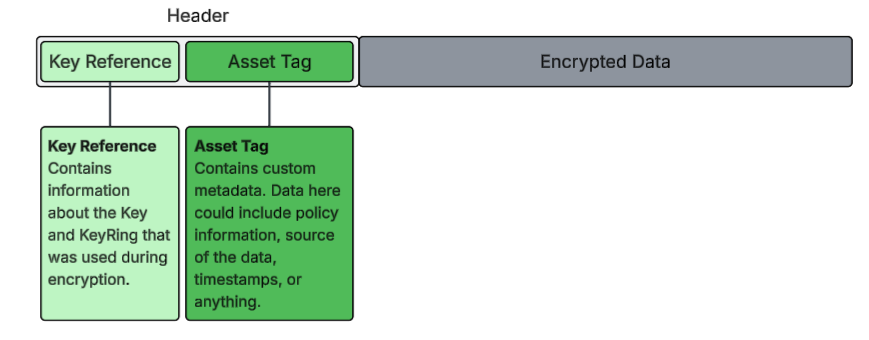
Asset Tagging adds metadata to an encrypted asset that is cryptographically signed. It is stored in the header that is prepended to the encrypted asset. This Tag can be used to manage the asset in any environment, and allow you to track its usage across any systems or workflows.
The metadata is available for viewing on the encrypted Asset. Any change to the metadata after it has been signed invalidates the signature, so the asset is flagged as tampered when it is decrypted, and rejected outright on KeyRings that require signed assets.
Creating an Asset
Basic Asset Creation
Assets are created by passing metadata to the encrypt method when you encrypt data. The metadata is stored in an encrypted header that's cryptographically signed and prepended to your encrypted payload.
Basic Syntax:
const encrypted = await ring.encrypt(data, {
   asset: {
      id: 'unique-identifier',
      name: 'Display Name',
      type: 'asset-type',
      // ... additional metadata
   }
})
Minimal Asset Example:
The simplest asset requires just an id and name:
const ring = await client.ring.get('Documents')

const encrypted = await ring.encrypt(documentContent, {
   asset: {
      id: 'doc-001',
      name: 'Q4 Financial Report'
   }
})

// Store the encrypted data
await db.documents.insert({
   id: 'doc-001',
   content: encrypted
})
Recommended Asset Structure:
For better organization and searchability, include type and domain-specific metadata:
const encrypted = await ring.encrypt(patientRecord, {
   asset: {
      id: 'patient-12345',
      name: 'Patient 12345 - Medical Record',
      type: 'phi',
      patientId: '12345',
      department: 'cardiology',
      recordType: 'medical-history',
      classification: 'highly-sensitive'
   }
})
Common Metadata Fields:
While you can include any metadata you need, these fields are commonly used:
| Field | Purpose | Example |
|---|---|---|
id |
Unique identifier for the asset | 'user-123', 'doc-456' |
name |
Display name (shown in Dashboard) | 'John Doe - SSN' |
type |
Asset category/classification | 'phi', 'pii', 'financial' |
classification |
Security classification level | 'public', 'confidential', 'highly-sensitive' |
department |
Owning department | 'hr', 'finance', 'legal' |
createdBy |
User who created the asset | 'user-789' |
createdAt |
Creation timestamp | '2024-01-15T10:00:00Z' |
What Happens When You Create an Asset
- Metadata is hashed - A SHA256 hash of your metadata is created
- Data is encrypted - Your actual data is encrypted using AES-256-GCM
- Header is created - The signed metadata header (including the Asset ID) is created
- Header is prepended - The header is prepended to the encrypted data
- Activity is logged - The creation is recorded in the Activity feed
What You Get Back:
The encrypt method returns a base64-encoded string containing the header and encrypted payload combined:
const encrypted = await ring.encrypt(data, {
   asset: { id: 'doc-123', name: 'Contract' }
})

// encrypted is a base64-encoded string:
// "eyJoZWFkZXIiOi...base64...encrypted-data"
// It contains both the signed header and encrypted payload
The Asset ID and all metadata are embedded in the header portion of this encrypted string. When you decrypt later with the SDK, the header is automatically parsed and validated.
Example: Creating Different Asset Types
User PII:
const encrypted = await ring.encrypt(userData, {
   asset: {
      id: `user-${userId}`,
      name: `${userName} - Email Address`,
      type: 'pii',
      userId,
      field: 'email',
      classification: 'confidential',
      gdpr: {
         legalBasis: 'consent',
         consentDate: '2024-01-15'
      }
   }
})
Financial Data:
const encrypted = await ring.encrypt(transactionData, {
   asset: {
      id: `transaction-${txnId}`,
      name: `Transaction ${txnId}`,
      type: 'financial',
      transactionId: txnId,
      amount: 1000.00,
      currency: 'USD',
      classification: 'confidential',
      compliance: {
         sox: true,
         auditRequired: true
      }
   }
})
Healthcare PHI:
const encrypted = await ring.encrypt(medicalRecord, {
   asset: {
      id: `patient-${patientId}`,
      name: `Patient ${patientId} - Lab Results`,
      type: 'phi',
      patientId,
      recordType: 'lab-results',
      testDate: '2024-01-20',
      classification: 'highly-sensitive',
      hipaa: {
         purpose: 'treatment',
         authorizedBy: 'dr-smith-123'
      },
      retention: {
         retentionYears: 7,
         destructionDate: '2031-01-20'
      }
   }
})
Document/File:
const encrypted = await ring.encrypt(fileContent, {
   asset: {
      id: `file-${fileId}`,
      name: 'Contract - Acme Corp.pdf',
      type: 'document',
      file: {
         originalName: 'contract-acme-corp.pdf',
         mimeType: 'application/pdf',
         size: 1024000,
         version: '1.0'
      },
      ownership: {
         owner: 'legal-team',
         createdBy: 'user-123',
         createdAt: '2024-01-15T10:00:00Z'
      },
      classification: 'confidential'
   }
})
Best Practices:
- Always include
idandname- Required for identification and Dashboard display - Use consistent
typevalues - Makes querying and filtering easier - Include classification - Helps with data governance and access control
- Add timestamps - Include
createdAtor similar for audit trails - Store the
assetId- You'll need it for updates and queries - Keep metadata lightweight - Asset metadata adds to the encrypted data size
- Use descriptive names - The
namefield appears in the Dashboard
Updating Asset Metadata
Update Existing Asset Metadata
You can update the metadata for an already-encrypted asset by providing the assetId property. This is useful when the asset's state or metadata changes over time (e.g., workflow state changes, approval updates, or classification changes).
Important: The encrypted data itself doesn't change - only the metadata associated with it is updated in the Activity feed.
// Initial encryption with workflow state
const encrypted = await ring.encrypt(document, {
   asset: {
      id: 'doc-123',
      name: 'Contract - Acme Corp',
      type: 'legal-document',
      workflow: {
         state: 'draft',
         createdBy: 'user-456',
         createdAt: '2024-01-15T10:00:00Z'
      },
      classification: 'confidential'
   }
})

// Store encrypted document
await db.documents.insert({
   id: 'doc-123',
   content: encrypted,
   assetId: 'asset-abc-123'  // Store the asset ID from the response
})

// Later: Update metadata when document is submitted for review
const updated = await ring.encrypt(document, {
   assetId: 'asset-abc-123',  // Reference existing asset
   asset: {
      id: 'doc-123',
      name: 'Contract - Acme Corp (Under Review)',
      type: 'legal-document',
      workflow: {
         state: 'under-review',
         submittedBy: 'user-456',
         submittedAt: '2024-01-16T14:00:00Z',
         assignedTo: 'manager-789',
         reviewDueDate: '2024-01-20'
      },
      classification: 'confidential'
   }
})

// Later: Update metadata when approved
const approved = await ring.encrypt(document, {
   assetId: 'asset-abc-123',  // Same asset ID
   asset: {
      id: 'doc-123',
      name: 'Contract - Acme Corp (Approved)',
      type: 'legal-document',
      workflow: {
         state: 'approved',
         approvedBy: 'manager-789',
         approvedAt: '2024-01-18T09:30:00Z',
         finalizedBy: 'legal-director-001'
      },
      classification: 'confidential',
      signedVersion: true
   }
})
Common Update Scenarios:
1. Workflow State Changes
// Document moves through approval workflow
async function updateDocumentWorkflow(docId, assetId, newState, metadata) {
   const ring = await client.ring.get('Documents')

   const encrypted = await ring.encrypt(documentContent, {
      assetId,  // Existing asset
      asset: {
         id: docId,
         name: `Document ${docId} - ${newState}`,
         type: 'document',
         workflow: {
            state: newState,
            updatedAt: new Date().toISOString(),
            ...metadata
         }
      }
   })

   return encrypted
}

// Usage
await updateDocumentWorkflow('doc-123', 'asset-abc-123', 'approved', {
   approvedBy: 'manager-789',
   approvalDate: '2024-01-18'
})
2. Compliance Status Updates
// Initial PHI encryption
const encrypted = await ring.encrypt(patientRecord, {
   asset: {
      id: `patient-${patientId}`,
      name: `Patient ${patientId} - Medical Record`,
      type: 'phi',
      hipaa: {
         purpose: 'treatment',
         authorizedBy: 'dr-smith-123',
         consentStatus: 'active'
      }
   }
})

// Later: Patient revokes consent
const updated = await ring.encrypt(patientRecord, {
   assetId: existingAssetId,
   asset: {
      id: `patient-${patientId}`,
      name: `Patient ${patientId} - Medical Record (Consent Revoked)`,
      type: 'phi',
      hipaa: {
         purpose: 'treatment',
         authorizedBy: 'dr-smith-123',
         consentStatus: 'revoked',
         revokedAt: '2024-02-01T10:00:00Z',
         revokedBy: patientId
      },
      accessRestricted: true
   }
})
3. Classification Changes
// Initial encryption with lower classification
const encrypted = await ring.encrypt(document, {
   asset: {
      id: 'report-456',
      name: 'Project Report - Alpha',
      type: 'document',
      classification: 'internal'
   }
})

// Later: Upgraded to confidential due to sensitive findings
const reclassified = await ring.encrypt(document, {
   assetId: existingAssetId,
   asset: {
      id: 'report-456',
      name: 'Project Report - Alpha (Confidential)',
      type: 'document',
      classification: 'confidential',
      reclassification: {
         previousLevel: 'internal',
         newLevel: 'confidential',
         reclassifiedAt: '2024-01-20T15:00:00Z',
         reclassifiedBy: 'security-officer-123',
         reason: 'Contains trade secrets'
      },
      accessControl: {
         restrictedTo: ['executives', 'legal']
      }
   }
})
4. Ownership Transfer
// Transfer document ownership
const transferred = await ring.encrypt(document, {
   assetId: existingAssetId,
   asset: {
      id: 'doc-789',
      name: 'Customer Contract - Transferred',
      type: 'legal-document',
      ownership: {
         previousOwner: 'user-123',
         currentOwner: 'user-456',
         transferredAt: '2024-01-25T12:00:00Z',
         transferReason: 'Employee departure',
         approvedBy: 'manager-789'
      }
   }
})
5. Audit Trail Enhancement
// Add audit information after security review
const audited = await ring.encrypt(data, {
   assetId: existingAssetId,
   asset: {
      id: 'data-001',
      name: 'Sensitive Data - Audited',
      type: 'sensitive-data',
      audit: {
         lastReviewed: '2024-01-30T10:00:00Z',
         reviewedBy: 'security-team',
         findings: 'compliant',
         nextReviewDate: '2024-04-30',
         certifications: ['SOC2', 'ISO27001']
      }
   }
})
Best Practices for Updates:
- Always include the
nameproperty - Keep Dashboard display names updated - Preserve important context - Include previous states or change history in metadata
- Timestamp all changes - Add
updatedAtor similar timestamps - Track who made changes - Include
updatedByor similar user identifiers - Document the reason - Add context for why metadata was updated
Managing Assets with the SDK Client
The client.assets namespace is the first-class way to work with assets from the SDK. It talks to the assets service over the SDK-owned HTTP transport and exposes the full lifecycle: tagged encrypt, read, search, re-tag, relate, family traversal, and bulk backfill. Its metadata field is the data bag; populate data.name with a human-readable label — it is the value shown as the asset's display name in activity logs and the Dashboard.
Tagged Encrypt — create an asset and get its id
assets.encrypt encrypts your data and creates the asset in one call, returning both the ciphertext and a reference to the created asset. It is the only encrypt that hands back the asset id.
const { data: ciphertext, asset } = await client.assets.encrypt(recordContent, 'Documents', {
   data: {
      name: 'Contract - Acme Corp',
      type: 'legal-document',
      classification: 'confidential'
   }
})

// Persist the asset id alongside your ciphertext — you need it to read, re-tag, or query later
await db.documents.insert({ id: asset.id, content: ciphertext })
Read an asset
assets.get returns the asset with its data, parent relationships, and full activity history (or undefined if it does not exist).
const asset = await client.assets.get('asset-abc-123')

console.log(asset.data.name)        // display name
console.log(asset.parents)          // [{ assetId, createdAt }, ...]
console.log(asset.activities.length)
Re-tag: metadata-only update vs. re-encryption
There are two ways to change an asset's metadata, and they are not equivalent:
assets.update(metadata-only re-tag) — patches the asset'sdataand/or parents server-side. The ciphertext is never touched, so the asset still decrypts exactly as before. This is the right tool for workflow-state changes, reclassification, or ownership transfer where the payload has not changed. It records anupdateactivity.- Re-encryption — calling
assets.encrypt(or the legacyring.encrypt) again produces new ciphertext. Use it only when the underlying data has actually changed. Re-encrypting just to edit a label needlessly rewrites the payload.
// Metadata-only re-tag — no re-encryption, ciphertext unchanged
const updated = await client.assets.update('asset-abc-123', {
   data: {
      name: 'Contract - Acme Corp (Approved)',
      type: 'legal-document',
      workflow: { state: 'approved', approvedBy: 'manager-789' },
      classification: 'confidential'
   }
})

console.log(updated.data.workflow.state)   // 'approved'
Relate assets and walk the family
Apply parent edges with assets.update using parentMode (Replace is the default; Add unions in new edges; Remove subtracts them), and read the full hierarchy with assets.family.
import { RelationshipMode } from '@grizzlycbg/grizzly-sdk'

// Add a parent edge without disturbing the existing set
await client.assets.update('asset-child', {
   parents: ['asset-parent'],
   parentMode: RelationshipMode.Add
})

// Traverse ancestors and descendants
const family = await client.assets.family('asset-parent')
console.log(family.summary.totalDescendants)
for (const descendant of family.descendants) {
   console.log(descendant.hierarchyLevel, descendant.data.name)
}
Bulk backfill existing data
assets.bulk runs a tagged encrypt (or any operation) over many items on a bounded-concurrency pool, isolating per-item failures so one bad record never rejects the batch. Pair it with client-minted ids (newAssetId) so a retried item addresses the same asset instead of creating a duplicate.
import { newAssetId } from '@grizzlycbg/grizzly-sdk'

const items = rows.map((row) => ({
   id: newAssetId(),
   payload: JSON.stringify(row),
   data: { name: row.label, type: 'record' }
}))

const result = await client.assets.bulk(items, {
   operation: (item) =>
      client.assets.encrypt(item.payload, 'Records', { data: item.data, assetId: item.id }),
   id: (item) => item.id,
   concurrency: 50
})

console.log(`Tagged ${result.succeeded}/${result.total}`)
const failedIds = result.results.filter((r) => !r.ok).map((r) => r.id)   // retry these by id
See the SDK API Reference for every method and option, and the SDK Code Examples for more worked flows.
Parent Assets and Hierarchical Relationships
Linking Assets with Parent Relationships
You can establish hierarchical relationships between assets using the parents property. The parents property is an array of Asset IDs that sits at the same level as the asset property. This creates parent-child relationships that help track related data and maintain organizational structure in the Activity feed.
When to Use Parent Assets:
- Document Versions - Link new versions to original documents
- Related Records - Connect child records to parent entities (e.g., transactions to accounts)
- Nested Data Structures - Represent hierarchical data (e.g., folders containing files)
- Workflow Lineage - Track data transformations and processing steps
- Compliance Auditing - Maintain relationships between related sensitive data
- Multi-Parent Relationships - An asset can have multiple parents (e.g., a document that belongs to multiple projects)
Basic Parent-Child Relationship:
// 1. Create parent asset (e.g., customer account)
const parentEncrypted = await ring.encrypt(accountData, {
   asset: {
      id: 'account-123',
      name: 'Customer Account - Acme Corp',
      type: 'account',
      accountId: 'account-123',
      createdAt: '2024-01-15T10:00:00Z'
   }
})

// Store the parent asset ID from the response
const parentAssetId = parentEncrypted.assetId  // e.g., 'asset-parent-abc-123'

// 2. Create child assets that reference the parent
const childEncrypted = await ring.encrypt(transactionData, {
   parents: [parentAssetId],  // Array of parent asset IDs
   asset: {
      id: 'transaction-456',
      name: 'Transaction - Purchase',
      type: 'transaction',
      transactionId: 'transaction-456',
      amount: 1000.00,
      timestamp: '2024-01-16T14:30:00Z'
   }
})

// Another child asset with same parent
const anotherChild = await ring.encrypt(transactionData2, {
   parents: [parentAssetId],  // Same parent
   asset: {
      id: 'transaction-789',
      name: 'Transaction - Refund',
      type: 'transaction',
      transactionId: 'transaction-789',
      amount: -50.00,
      timestamp: '2024-01-17T09:00:00Z'
   }
})

// Result: Activity feed shows hierarchy
// └─ Customer Account - Acme Corp
//    ├─ Transaction - Purchase
//    └─ Transaction - Refund
Adding Parents to Existing Asset:
You can update an existing asset to add parent relationships:
// Existing standalone asset
const originalEncrypted = await ring.encrypt(document, {
   asset: {
      id: 'doc-999',
      name: 'Standalone Document',
      type: 'document'
   }
})

// Later: Add parent relationship (e.g., discovered this belongs to a project)
const updated = await ring.encrypt(document, {
   assetId: 'asset-doc-999',  // Existing asset
   parents: ['asset-project-alpha-123'],  // Add parent link
   asset: {
      id: 'doc-999',
      name: 'Standalone Document (Project Alpha)',
      type: 'document',
      linkedAt: '2024-01-20T10:00:00Z',
      linkedBy: 'user-456',
      linkedReason: 'Document categorization update'
   }
})
Multiple Parents:
An asset can belong to multiple parents, useful for cross-cutting concerns:
// Create multiple parent assets
const projectAlpha = await ring.encrypt(projectData, {
   asset: {
      id: 'project-alpha',
      name: 'Project Alpha',
      type: 'project'
   }
})

const legalDept = await ring.encrypt(deptData, {
   asset: {
      id: 'dept-legal',
      name: 'Legal Department',
      type: 'department'
   }
})

// Document belongs to both a project and a department
const document = await ring.encrypt(documentData, {
   parents: [projectAlpha.assetId, legalDept.assetId],  // Multiple parents
   asset: {
      id: 'contract-001',
      name: 'Vendor Contract - Acme Corp',
      type: 'legal-document',
      relatedTo: 'Project Alpha and Legal Department'
   }
})

// Result: Document appears under both parents in Activity feed
// └─ Project Alpha
//    └─ Vendor Contract - Acme Corp
// └─ Legal Department
//    └─ Vendor Contract - Acme Corp
Use Case Examples:
1. Document Version Control
// Original document (v1.0)
const v1 = await ring.encrypt(documentV1, {
   asset: {
      id: 'contract-acme',
      name: 'Contract - Acme Corp v1.0',
      type: 'legal-document',
      version: '1.0',
      createdAt: '2024-01-15T10:00:00Z',
      createdBy: 'user-123'
   }
})

const v1AssetId = v1.assetId

// Revised document (v2.0) - linked to original
const v2 = await ring.encrypt(documentV2, {
   parents: [v1AssetId],  // Link to v1.0
   asset: {
      id: 'contract-acme-v2',
      name: 'Contract - Acme Corp v2.0',
      type: 'legal-document',
      version: '2.0',
      previousVersion: '1.0',
      revisedAt: '2024-01-20T14:00:00Z',
      revisedBy: 'user-456',
      changesSummary: 'Updated payment terms and added termination clause'
   }
})

// Final version (v3.0) - linked to v2.0
const v3 = await ring.encrypt(documentV3, {
   parents: [v2.assetId],  // Link to v2.0
   asset: {
      id: 'contract-acme-v3',
      name: 'Contract - Acme Corp v3.0 (Final)',
      type: 'legal-document',
      version: '3.0',
      previousVersion: '2.0',
      finalizedAt: '2024-01-25T09:00:00Z',
      signedBy: ['acme-corp', 'our-company'],
      status: 'executed'
   }
})

// Result: Version chain in Activity feed
// └─ Contract v1.0
//    └─ Contract v2.0
//       └─ Contract v3.0 (Final)
2. Patient Records Hierarchy (HIPAA)
// Patient master record (parent)
const patientRecord = await ring.encrypt(patientData, {
   asset: {
      id: `patient-${patientId}`,
      name: `Patient ${patientId} - Master Record`,
      type: 'phi-master',
      patientId,
      createdAt: '2024-01-15T10:00:00Z'
   }
})

const patientAssetId = patientRecord.assetId

// Medical history (child)
const medicalHistory = await ring.encrypt(historyData, {
   parents: [patientAssetId],
   asset: {
      id: `patient-${patientId}-history`,
      name: `Patient ${patientId} - Medical History`,
      type: 'phi',
      recordType: 'medical-history',
      hipaa: { purpose: 'treatment' }
   }
})

// Lab results (child)
const labResults = await ring.encrypt(labData, {
   parents: [patientAssetId],
   asset: {
      id: `patient-${patientId}-lab-2024-01`,
      name: `Patient ${patientId} - Lab Results Jan 2024`,
      type: 'phi',
      recordType: 'lab-results',
      testDate: '2024-01-20',
      hipaa: { purpose: 'treatment' }
   }
})

// Prescriptions (child)
const prescriptions = await ring.encrypt(rxData, {
   parents: [patientAssetId],
   asset: {
      id: `patient-${patientId}-rx`,
      name: `Patient ${patientId} - Prescriptions`,
      type: 'phi',
      recordType: 'prescriptions',
      hipaa: { purpose: 'treatment' }
   }
})

// Result: Patient record hierarchy
// └─ Patient 12345 - Master Record
//    ├─ Medical History
//    ├─ Lab Results Jan 2024
//    └─ Prescriptions
3. Folder/File Hierarchy
// Folder (parent)
const folder = await ring.encrypt(folderMetadata, {
   asset: {
      id: 'folder-legal-2024',
      name: 'Legal Documents 2024',
      type: 'folder',
      path: '/legal/2024',
      createdAt: '2024-01-01T00:00:00Z'
   }
})

const folderAssetId = folder.assetId

// Files in folder (children)
const file1 = await ring.encrypt(fileContent1, {
   parents: [folderAssetId],
   asset: {
      id: 'file-contract-001',
      name: 'Contract - Client A.pdf',
      type: 'file',
      path: '/legal/2024/Contract - Client A.pdf',
      mimeType: 'application/pdf'
   }
})

const file2 = await ring.encrypt(fileContent2, {
   parents: [folderAssetId],
   asset: {
      id: 'file-nda-002',
      name: 'NDA - Partner B.docx',
      type: 'file',
      path: '/legal/2024/NDA - Partner B.docx',
      mimeType: 'application/vnd.openxmlformats-officedocument.wordprocessingml.document'
   }
})

// Result: Folder structure
// └─ Legal Documents 2024
//    ├─ Contract - Client A.pdf
//    └─ NDA - Partner B.docx
4. Data Processing Pipeline
// Source data (parent)
const sourceData = await ring.encrypt(rawData, {
   asset: {
      id: 'import-2024-01-15',
      name: 'Customer Data Import - Jan 15',
      type: 'data-import',
      source: 'crm-system',
      recordCount: 10000,
      importedAt: '2024-01-15T08:00:00Z'
   }
})

const sourceAssetId = sourceData.assetId

// Validated data (child - step 1)
const validatedData = await ring.encrypt(cleanedData, {
   parents: [sourceAssetId],
   asset: {
      id: 'validated-2024-01-15',
      name: 'Validated Customer Data - Jan 15',
      type: 'data-processing',
      processingStep: 'validation',
      recordCount: 9850,
      invalidRecords: 150,
      processedAt: '2024-01-15T09:00:00Z'
   }
})

// Enriched data (child - step 2)
const enrichedData = await ring.encrypt(enrichedDataContent, {
   parents: [validatedData.assetId],  // Parent is previous step
   asset: {
      id: 'enriched-2024-01-15',
      name: 'Enriched Customer Data - Jan 15',
      type: 'data-processing',
      processingStep: 'enrichment',
      recordCount: 9850,
      fieldsAdded: ['segment', 'lifetime_value'],
      processedAt: '2024-01-15T10:00:00Z'
   }
})

// Result: Processing pipeline lineage
// └─ Customer Data Import - Jan 15
//    └─ Validated Customer Data - Jan 15
//       └─ Enriched Customer Data - Jan 15
5. Multi-Level Organizational Hierarchy
// Organization (top level)
const org = await ring.encrypt(orgData, {
   asset: {
      id: 'org-acme',
      name: 'Organization - Acme Corp',
      type: 'organization',
      orgId: 'acme-corp'
   }
})

// Department (child of org)
const dept = await ring.encrypt(deptData, {
   parents: [org.assetId],
   asset: {
      id: 'dept-engineering',
      name: 'Department - Engineering',
      type: 'department',
      deptId: 'engineering'
   }
})

// Team (child of department)
const team = await ring.encrypt(teamData, {
   parents: [dept.assetId],
   asset: {
      id: 'team-platform',
      name: 'Team - Platform Engineering',
      type: 'team',
      teamId: 'platform-eng'
   }
})

// Employee records (children of team)
const employee = await ring.encrypt(employeeData, {
   parents: [team.assetId],
   asset: {
      id: 'employee-123',
      name: 'Employee - John Doe',
      type: 'employee-record',
      employeeId: 'emp-123'
   }
})

// Result: Multi-level hierarchy
// └─ Organization - Acme Corp
//    └─ Department - Engineering
//       └─ Team - Platform Engineering
//          └─ Employee - John Doe
Relationships Form a DAG — No Cycles
Parent relationships must form a directed acyclic graph. An asset can never become its own ancestor, at any depth — directly (an asset naming itself as a parent) or indirectly (A parents B, B parents C, C parents A). Attempting to set a parent relationship that would create a cycle is rejected with a 409 Conflict, and nothing is changed:
curl -X PATCH https://your-tenant.grizzlycbg.io/assets/asset-c \
  -H "Authorization: Bearer apikey-xxx" \
  -H "Content-Type: application/json" \
  -d '{"parents": ["asset-a"], "parentMode": "add"}'
HTTP/1.1 409 Conflict
Content-Type: application/json

{
  "message": "Failed to update Asset \"asset-c\". This parent set would create a relationship cycle."
}
This check runs whenever you change an asset's parent set — most commonly through assets.update. Creating a brand-new asset with an initial set of parents is unaffected: a new asset has no descendants yet, so it cannot close a loop no matter what parents you give it.
If two assets genuinely derive from each other, model it — don't cycle it. A cycle isn't a data-lineage shortcut; it makes "where did this come from" unanswerable, since a trace that loops back on itself never reaches an origin. The two patterns that express legitimate mutual derivation without a cycle:
- A shared parent asset. Instead of A parenting B and B parenting A, create a common ancestor both derive from (e.g. a
mergeorsnapshotasset that both A and B point to). - One canonical direction, with versioning. If A and B are really two states of the same evolving record, parent the newer state to the older one (as in the Document Version Control example above) rather than linking them both ways.
Benefits of Parent Assets:
- Audit Trail - Track relationships between related data in Activity feed
- Data Lineage - Understand data provenance and transformations
- Compliance - Demonstrate data relationships for regulatory requirements
- Organization - Maintain logical structure of encrypted data
- Discovery - Find all related assets by querying parent relationships
Querying Parent-Child Relationships:
// Find all children of a parent asset
const children = await assetApi.query({
   'parents': parentAssetId  // Find assets that have this parent
})

// Or if searching for assets with a specific parent in their parents array
const children = await assetApi.query({
   'parents': { $in: [parentAssetId] }
})

// Find assets with multiple specific parents
const assetsWithBothParents = await assetApi.query({
   'parents': { $all: [parentAssetId1, parentAssetId2] }
})

// Find entire hierarchy
async function getAssetHierarchy(assetId) {
   // Get the asset
   const asset = await assetApi.getAsset(assetId)

   // Get all children (assets that have this assetId in their parents array)
   const children = await assetApi.query({
      'parents': assetId
   })

   // Recursively get children's children
   const childHierarchies = await Promise.all(
      children.map(child => getAssetHierarchy(child.assetId))
   )

   return {
      asset,
      children: childHierarchies
   }
}

// Find all descendants (children, grandchildren, etc.)
async function getAllDescendants(parentAssetId, results = []) {
   const children = await assetApi.query({
      'parents': parentAssetId
   })

   results.push(...children)

   for (const child of children) {
      await getAllDescendants(child.assetId, results)
   }

   return results
}
Common Use Cases
Compliance and Audit Trails
Assets provide a built-in audit trail for compliance requirements (HIPAA, GDPR, SOC2):
HIPAA - Protected Health Information (PHI)
const encrypted = await ring.encrypt(patientRecord, {
   asset: {
      id: `patient-${patientId}`,
      name: `Patient ${patientId} - Medical Record`,
      type: 'phi',
      patientId,
      recordType: 'medical-history',
      hipaa: {
         purpose: 'treatment',
         authorizedBy: 'dr-smith-123',
         accessReason: 'routine-checkup',
         phi_category: 'medical-records'
      },
      retention: {
         retentionYears: 7,
         destructionDate: '2031-01-15'
      }
   }
})

// Track: Who accessed PHI, when, and for what purpose
GDPR - Personal Data Processing
const encrypted = await ring.encrypt(userData, {
   asset: {
      id: `user-${userId}`,
      name: `User ${userId} - Personal Data`,
      type: 'pii',
      userId,
      gdpr: {
         legalBasis: 'consent',
         consentId: 'consent-789',
         consentDate: '2024-01-15',
         dataSubjectRights: ['access', 'rectification', 'erasure'],
         processingPurpose: 'customer-service'
      },
      dataClassification: 'personal-identifiable'
   }
})

// Track: Legal basis for processing, consent, and data subject rights
PCI-DSS - Payment Card Data
const encrypted = await ring.encrypt(cardData, {
   asset: {
      id: `transaction-${txnId}`,
      name: `Transaction ${txnId} - Card Data`,
      type: 'payment',
      transactionId: txnId,
      pci: {
         scope: 'cardholder-data',
         environment: 'production',
         processor: 'stripe',
         maskedPan: 'xxxx-xxxx-xxxx-1234'
      },
      compliance: {
         standard: 'pci-dss-v4',
         requirement: '3.4'  // Render PAN unreadable
      }
   }
})

// Track: Payment card data access and compliance
Data Classification and Governance
Use Assets to classify and track sensitive data across your organization:
Data Classification Levels
// Public data
const publicEncrypted = await ring.encrypt(marketingContent, {
   asset: {
      id: 'content-123',
      name: 'Marketing Material - Q4 Campaign',
      type: 'content',
      classification: 'public',
      department: 'marketing'
   }
})

// Internal data
const internalEncrypted = await ring.encrypt(employeeDirectory, {
   asset: {
      id: 'directory-2024',
      name: 'Employee Directory 2024',
      type: 'internal',
      classification: 'internal',
      department: 'hr',
      restrictedTo: ['employees']
   }
})

// Confidential data
const confidentialEncrypted = await ring.encrypt(financialReport, {
   asset: {
      id: 'report-q4-2024',
      name: 'Q4 Financial Report 2024',
      type: 'financial',
      classification: 'confidential',
      department: 'finance',
      restrictedTo: ['finance', 'executives'],
      approvalRequired: true
   }
})

// Highly sensitive data
const secretEncrypted = await ring.encrypt(tradeSecret, {
   asset: {
      id: 'patent-application-2024',
      name: 'Patent Application - New Algorithm',
      type: 'intellectual-property',
      classification: 'highly-sensitive',
      department: 'r&d',
      restrictedTo: ['r&d-leads', 'legal'],
      nda: true,
      exportControl: 'itar'
   }
})
Data Lifecycle Management
const encrypted = await ring.encrypt(document, {
   asset: {
      id: 'doc-456',
      name: 'Contract - Acme Corp Partnership',
      type: 'legal-document',
      lifecycle: {
         createdAt: '2024-01-15',
         createdBy: 'user-123',
         status: 'active',
         retentionPeriod: '7-years',
         disposalMethod: 'secure-deletion',
         reviewDate: '2025-01-15'
      },
      ownership: {
         owner: 'legal-team',
         custodian: 'user-456',
         steward: 'legal-director'
      }
   }
})
Multi-Tenant Data Isolation
Track which tenant owns each encrypted asset:
const encrypted = await ring.encrypt(tenantData, {
   asset: {
      id: `tenant-${tenantId}-data`,
      name: `Tenant ${tenantName} - Customer Data`,
      type: 'tenant-data',
      tenant: {
         id: tenantId,
         name: tenantName,
         region: 'us-west-2',
         tier: 'enterprise'
      },
      isolation: {
         dataResidency: 'us',
         dedicatedKeyRing: true,
         separateDatabase: true
      }
   }
})

// Query Activity feed by tenant ID to track cross-tenant access
File and Document Metadata
Track file-specific metadata for document management systems:
const encrypted = await ring.encrypt(fileContent, {
   asset: {
      id: `file-${fileId}`,
      name: fileName,  // Original filename for Dashboard display
      type: 'document',
      file: {
         originalName: 'contract-2024.pdf',
         mimeType: 'application/pdf',
         size: 1024000,  // bytes
         checksum: 'sha256-hash-of-original',
         version: '2.0',
         previousVersionId: 'file-123-v1'
      },
      metadata: {
         author: 'Jane Smith',
         createdDate: '2024-01-15',
         lastModified: '2024-01-20',
         tags: ['contract', '2024', 'legal'],
         folder: '/legal/contracts/2024'
      }
   }
})
Workflow and Approval Tracking
Track approval workflows and state changes:
const encrypted = await ring.encrypt(expenseReport, {
   asset: {
      id: `expense-${reportId}`,
      name: `Expense Report - ${employeeName}`,
      type: 'expense-report',
      workflow: {
         state: 'pending-approval',
         submittedBy: 'employee-123',
         submittedAt: '2024-01-15T10:00:00Z',
         assignedTo: 'manager-456',
         approvalChain: ['manager-456', 'finance-789'],
         currentApprover: 'manager-456',
         dueDate: '2024-01-20'
      },
      business: {
         department: 'engineering',
         project: 'project-alpha',
         costCenter: 'cc-1234',
         amount: 500.00,
         currency: 'USD'
      }
   }
})

// Update workflow state with new encryption
const approved = await ring.encrypt(expenseReport, {
   asset: {
      id: `expense-${reportId}`,
      name: `Expense Report - ${employeeName} (Approved)`,
      type: 'expense-report',
      workflow: {
         state: 'approved',
         approvedBy: 'manager-456',
         approvedAt: '2024-01-16T14:30:00Z',
         nextAction: 'payment-processing'
      }
   }
})
Structuring Asset Metadata
Best Practices
1. Use Consistent Structure
Define standard metadata schemas for each asset type:
// Standard user PII structure
const USER_PII_SCHEMA = {
   id: 'string',           // Unique identifier
   name: 'string',         // Display name for Dashboard
   type: 'pii',            // Asset type
   userId: 'string',       // User identifier
   field: 'string',        // Field name (e.g., 'ssn', 'email')
   classification: 'string', // Data classification level
   department: 'string'    // Owning department
}

// Apply consistently
const encrypted = await ring.encrypt(userData, {
   asset: {
      id: `user-${userId}`,
      name: `${userName} - SSN`,
      type: 'pii',
      userId,
      field: 'ssn',
      classification: 'highly-sensitive',
      department: 'hr'
   }
})
2. Include Contextual Information
Add context that helps identify why data was encrypted:
const encrypted = await ring.encrypt(data, {
   asset: {
      id: `record-${id}`,
      name: `Customer Record - ${customerName}`,
      type: 'customer-data',
      context: {
         action: 'customer-onboarding',
         triggeredBy: 'user-123',
         triggeredAt: new Date().toISOString(),
         source: 'web-application',
         ipAddress: '192.168.1.1',
         userAgent: 'Mozilla/5.0...'
      }
   }
})
3. Support Querying and Filtering
Include fields that enable filtering in the Activity feed:
const encrypted = await ring.encrypt(data, {
   asset: {
      id: `transaction-${txnId}`,
      name: `Transaction ${txnId}`,
      type: 'transaction',
      // Queryable fields
      dateRange: '2024-01',      // Monthly grouping
      status: 'completed',        // Filter by status
      amount: 1000.00,            // Numeric filtering
      region: 'us-west',          // Geographic filtering
      customerId: 'cust-123',     // Customer-specific queries
      tags: ['payment', 'recurring']  // Tag-based filtering
   }
})
4. Keep It Lightweight
Asset metadata adds to the encrypted data size. Balance detail with efficiency:
// Too verbose
const encrypted = await ring.encrypt(data, {
   asset: {
      id: 'record-123',
      name: 'Record 123',
      type: 'data',
      veryLongDescription: 'This is an extremely long description that contains redundant information...',
      metadata: {
         field1: 'value1',
         field2: 'value2',
         // ... 50 more fields
      }
   }
})

// Concise and purposeful
const encrypted = await ring.encrypt(data, {
   asset: {
      id: 'record-123',
      name: 'Customer Record - Acme Corp',
      type: 'customer-data',
      customerId: 'cust-456',
      classification: 'confidential',
      department: 'sales'
   }
})
Querying Assets
Assets API Endpoints
The Assets API provides endpoints to query, retrieve, and manage asset metadata. All endpoints require authentication via API Key.
API Endpoints
Base URL: https://your-tenant.grizzlycbg.io/assets
| Endpoint | Method | Description |
|---|---|---|
/assets/:id |
GET | Retrieve a specific asset by ID |
/assets/search |
POST | Search assets with filters and pagination |
/assets/:id |
DELETE | Delete an asset by ID |
/assets/:id/activities |
GET | Retrieve an asset's activity history, paginated — works even after the asset has been deleted |
Get Asset by ID
Retrieve a specific asset including its data, parent relationships, and full activity history.
Endpoint: GET /assets/:id
Request:
curl -X GET https://your-tenant.grizzlycbg.io/assets/asset-123 \
  -H "Authorization: Bearer apikey-xxx"
Response:
{
  "id": "asset-123",
  "createdAt": "2024-01-15T10:00:00Z",
  "data": {
    "name": "Patient 12345 - Medical Record",
    "type": "phi",
    "patientId": "12345",
    "department": "cardiology"
  },
  "parents": [
    {
      "assetId": "asset-parent-456",
      "createdAt": "2024-01-15T09:00:00Z"
    }
  ],
  "activities": [
    {
      "id": "asset-activity-abc",
      "assetId": "asset-123",
      "action": "created",
      "actionValid": true,
      "createdAt": "2024-01-15T10:00:00Z",
      "context": {
        "accountId": "acc-789",
        "keyringId": "ring-101",
        "apikeyId": "key-202"
      },
      "data": {}
    }
  ]
}
Search Assets
Search and filter assets with flexible criteria and cursor-based pagination.
Endpoint: POST /assets/search
Query Parameters:
- cursor (string, optional): Pagination cursor for next page
- limit (integer, optional): Items per page (default: 100)
Request Body (all fields optional):
{
  apikeyId?: string        // Filter by API Key ID
  accountId?: string       // Filter by Account ID
  keyringId?: string       // Filter by KeyRing ID
  parents?: string[]       // CURRENT state: assets whose parent set right now contains any of these IDs
  everParentedBy?: string  // HISTORY: assets that were EVER parented by this asset ID, even if that link has since been removed
  start?: string           // Start time (ISO-8601)
  end?: string             // End time (ISO-8601)
  data?: Object            // Filter by asset data (supports nested propeties ie. property.child)
}
Response:
{
  "data": [
    {
      "id": "asset-123",
      "createdAt": "2024-01-15T10:00:00Z",
      "data": {
        "name": "Patient Record",
        "type": "phi"
      }
    }
  ],
  "pagination": {
    "limit": 100,
    "count": 25,
    "hasMore": false,
    "nextCursor": null
  }
}
Query Examples
Filter by Asset Type (PHI)
const response = await fetch('https://your-tenant.grizzlycbg.io/assets/search?limit=50', {
  method: 'POST',
  headers: {
    'Authorization': `Bearer ${apiKey}`,
    'Content-Type': 'application/json'
  },
  body: JSON.stringify({
    data: {
      type: 'phi'  // Matching on data.type field
    },
    start: '2024-01-01T00:00:00Z',
    end: '2024-01-31T23:59:59Z'
  })
})

const result = await response.json()
console.log(`Found ${result.data.length} PHI assets`)
Filter by Department
const response = await fetch('https://your-tenant.grizzlycbg.io/assets/search', {
  method: 'POST',
  headers: {
    'Authorization': `Bearer ${apiKey}`,
    'Content-Type': 'application/json'
  },
  body: JSON.stringify({
    data: {
      department: 'finance'  // Match assets where data.department = 'finance'
    },
    start: '2024-01-01T00:00:00Z',
    end: '2024-12-31T23:59:59Z'
  })
})

const result = await response.json()
Filter by Patient ID (HIPAA Audit)
// Find all assets related to a specific patient
const response = await fetch('https://your-tenant.grizzlycbg.io/assets/search', {
  method: 'POST',
  headers: {
    'Authorization': `Bearer ${apiKey}`,
    'Content-Type': 'application/json'
  },
  body: JSON.stringify({
    data: {
      type: 'phi',
      patientId: 'patient-456'
    }
  })
})

const result = await response.json()

// Examine activity history for compliance
result.data.forEach(asset => {
  console.log(`Asset: ${asset.data.name}`)
  console.log(`Created: ${asset.createdAt}`)
})
Filter by KeyRing
// Find all assets encrypted with a specific KeyRing
const response = await fetch('https://your-tenant.grizzlycbg.io/assets/search', {
  method: 'POST',
  headers: {
    'Authorization': `Bearer ${apiKey}`,
    'Content-Type': 'application/json'
  },
  body: JSON.stringify({
    keyringId: 'ring-medical-records'
  })
})

const result = await response.json()
Filter by Parent Assets
// Find all child assets of a parent
const response = await fetch('https://your-tenant.grizzlycbg.io/assets/search', {
  method: 'POST',
  headers: {
    'Authorization': `Bearer ${apiKey}`,
    'Content-Type': 'application/json'
  },
  body: JSON.stringify({
    parents: ['asset-parent-123']  // Assets that have this parent
  })
})

const result = await response.json()

// Result includes all assets with asset-parent-123 in their parents array
result.data.forEach(child => {
  console.log(`Child asset: ${child.id}`)
})
State vs. History: parents vs. everParentedBy
parents reads the asset's current relationships. everParentedBy reads its history — every asset that was ever attached to a given parent, including links that have since been removed. This distinction matters for reorganizations: a document that gets re-parented from one project to another still appears under its original project when you query history, even though parents no longer returns it.
// A document starts under Project Alpha...
await fetch('https://your-tenant.grizzlycbg.io/assets/doc-001', {
  method: 'PATCH',
  headers: { 'Authorization': `Bearer ${apiKey}`, 'Content-Type': 'application/json' },
  body: JSON.stringify({ parents: [projectAlphaId], parentMode: 'replace' })
})

// ...then later gets re-parented to Project Beta
await fetch('https://your-tenant.grizzlycbg.io/assets/doc-001', {
  method: 'PATCH',
  headers: { 'Authorization': `Bearer ${apiKey}`, 'Content-Type': 'application/json' },
  body: JSON.stringify({ parents: [projectBetaId], parentMode: 'replace' })
})

// CURRENT state: the document is under Beta now, so Alpha's `parents` query misses it
const currentChildren = await fetch('https://your-tenant.grizzlycbg.io/assets/search', {
  method: 'POST',
  headers: { 'Authorization': `Bearer ${apiKey}`, 'Content-Type': 'application/json' },
  body: JSON.stringify({ parents: [projectAlphaId] })
})
// -> does NOT include the document

// HISTORY: an audit asking "what ever passed through Project Alpha" still needs it
const everChildren = await fetch('https://your-tenant.grizzlycbg.io/assets/search', {
  method: 'POST',
  headers: { 'Authorization': `Bearer ${apiKey}`, 'Content-Type': 'application/json' },
  body: JSON.stringify({ everParentedBy: projectAlphaId })
})
// -> includes the document, because it was once a child of Project Alpha
Use parents to answer "what does this asset own right now" and everParentedBy to answer "what has ever passed through this asset" — the second is the one a lineage or compliance audit usually wants.
Time-Based Query (Last 24 Hours)
const twentyFourHoursAgo = new Date(Date.now() - 24 * 60 * 60 * 1000).toISOString()

const response = await fetch('https://your-tenant.grizzlycbg.io/assets/search', {
  method: 'POST',
  headers: {
    'Authorization': `Bearer ${apiKey}`,
    'Content-Type': 'application/json'
  },
  body: JSON.stringify({
    start: twentyFourHoursAgo
  })
})

const result = await response.json()
console.log(`${result.data.length} assets created in last 24 hours`)
Complex Query (Nested Data)
// Search for assets with specific nested data structures
const response = await fetch('https://your-tenant.grizzlycbg.io/assets/search', {
  method: 'POST',
  headers: {
    'Authorization': `Bearer ${apiKey}`,
    'Content-Type': 'application/json'
  },
  body: JSON.stringify({
    data: {
      type: 'phi',
      hipaa: {
        purpose: 'treatment'  // Nested matching
      }
    },
    start: '2024-01-01T00:00:00Z',
    end: '2024-03-31T23:59:59Z'
  })
})

const result = await response.json()
Combined Filters (GDPR Compliance)
// Complex audit query for GDPR data subject access request
const response = await fetch('https://your-tenant.grizzlycbg.io/assets/search', {
  method: 'POST',
  headers: {
    'Authorization': `Bearer ${apiKey}`,
    'Content-Type': 'application/json'
  },
  body: JSON.stringify({
    accountId: 'acc-customer-portal',
    data: {
      type: 'pii',
      userId: 'user-789',
      gdpr: {
        legalBasis: 'consent'
      }
    },
    start: '2023-01-01T00:00:00Z',
    end: '2024-12-31T23:59:59Z'
  })
})

const result = await response.json()

// Export all personal data for GDPR request
const personalData = result.data.map(asset => ({
  assetId: asset.id,
  createdAt: asset.createdAt,
  data: asset.data
}))
Pagination (Cursor-Based)
async function getAllAssets(filters) {
  let allAssets = []
  let cursor = null
  let hasMore = true

  while (hasMore) {
    const url = cursor
      ? `https://your-tenant.grizzlycbg.io/assets/search?cursor=${cursor}&limit=100`
      : `https://your-tenant.grizzlycbg.io/assets/search?limit=100`

    const response = await fetch(url, {
      method: 'POST',
      headers: {
        'Authorization': `Bearer ${apiKey}`,
        'Content-Type': 'application/json'
      },
      body: JSON.stringify(filters)
    })

    const result = await response.json()

    allAssets = allAssets.concat(result.data)
    hasMore = result.pagination.hasMore
    cursor = result.pagination.nextCursor

    console.log(`Fetched ${result.pagination.count} assets, total: ${allAssets.length}`)
  }

  return allAssets
}

// Usage: Get all PHI assets with pagination
const allPhiAssets = await getAllAssets({
  data: { type: 'phi' }
})

console.log(`Total PHI assets: ${allPhiAssets.length}`)
Delete Asset
Delete an asset by ID. This operation is idempotent - returns success even if the asset doesn't exist.
Endpoint: DELETE /assets/:id
Request:
curl -X DELETE https://your-tenant.grizzlycbg.io/assets/asset-123 \
  -H "Authorization: Bearer apikey-xxx"
Response:
{
  "success": true
}
What actually happens on delete:
- The asset's audit trail is kept, its content is erased. The fact that each action happened — who did it, which KeyRing and Account were involved, and when — is retained. The metadata payload each activity carried (the
databag) is dropped to{}. This is the compliance-friendly shape: you can still answer "who touched this asset and when," you just can't recover what it contained. - The deletion itself is recorded as an activity, naming the Account (or, for a dashboard-initiated delete, the person) who deleted it.
- Any surviving child that named the deleted asset as a parent gets its own activity recording that the link was removed and why — so a child's lineage never changes silently. See Activity History below.
- Decrypting old ciphertext for a deleted asset still works. The key material and header are untouched by deletion, so decryption succeeds normally; the resulting
decryptactivity is recorded against the deleted asset with its content redacted, same as everything else in its trail. - The asset itself is gone.
GET /assets/:idreturns nothing for a deleted asset — useGET /assets/:id/activities(below) to retrieve what remains of its history.
Get Asset Activity History
Retrieve an asset's activity history directly, paginated. Unlike GET /assets/:id, this endpoint keeps working after the asset has been deleted — that's the point of it. It's the way to pull a deleted asset's audit trail for a compliance review or an incident investigation once the asset itself is gone.
Endpoint: GET /assets/:id/activities
Query Parameters:
- cursor (string, optional): Pagination cursor for next page
- limit (integer, optional): Items per page
Request:
curl -X GET "https://your-tenant.grizzlycbg.io/assets/asset-123/activities?limit=50" \
  -H "Authorization: Bearer apikey-xxx"
Response:
{
  "data": [
    {
      "id": "asset-activity-abc",
      "assetId": "asset-123",
      "action": "deleted",
      "actionValid": true,
      "createdAt": "2024-02-01T10:00:00Z",
      "context": { "accountId": "acc-789" },
      "data": {}
    },
    {
      "id": "asset-activity-def",
      "assetId": "asset-123",
      "action": "decrypt",
      "actionValid": true,
      "createdAt": "2024-01-20T09:00:00Z",
      "context": { "accountId": "acc-789", "keyringId": "ring-101" },
      "data": {}
    },
    {
      "id": "asset-activity-ghi",
      "assetId": "asset-123",
      "action": "created",
      "actionValid": true,
      "createdAt": "2024-01-15T10:00:00Z",
      "context": { "accountId": "acc-789" },
      "data": {}
    }
  ],
  "pagination": {
    "limit": 50,
    "count": 3,
    "hasMore": false,
    "nextCursor": null
  }
}
Every activity in a deleted asset's trail carries data: {} — the ones that existed before the delete had their content erased at delete time, and any later activity (like a decrypt of old ciphertext) has its content erased as it's written. Only the facts survive: which Account or Account/KeyRing/API Key combination acted, what the action was, whether it succeeded, and when.
SDK equivalent:
const page = await client.assets.activities('asset-123')
for (const activity of page.data) {
   console.log(activity.action, activity.createdAt)
}

// Works after deletion too
await client.assets.delete('asset-123')
const history = await client.assets.activities('asset-123')
console.log(history.data.length)   // the trail is still there
Activity History
When you retrieve a specific asset using GET /assets/:id, the response includes the complete activity history in the activities array. This provides an immutable audit trail of all actions performed on the asset. Once an asset is deleted, use GET /assets/:id/activities instead — the embedded array on GET /assets/:id is naturally unavailable once the asset itself is gone.
What shows up in the trail:
- Relationship changes are individual activities, not just a summary. Adding a parent records a
parent.addedactivity; removing one recordsparent.removed. When a link is removed because the parent was deleted, that activity carries a reason (cause: "parent-asset-deleted") so the child's history explains itself without cross-referencing the parent. - Only real changes are recorded. Re-applying a parent relationship that already exists, or removing one that isn't there, changes nothing and produces no activity — the trail reflects what actually happened, not what was requested.
- Dashboard actions record the person, not just a service account. An update made through the Dashboard is attributed to the human who made it, the same way an API-key-authenticated request is attributed to its Account.
// Get asset with full activity history
const response = await fetch('https://your-tenant.grizzlycbg.io/assets/asset-123', {
  headers: {
    'Authorization': `Bearer ${apiKey}`
  }
})

const asset = await response.json()

// Examine activity trail
asset.activities.forEach(activity => {
  console.log(`Action: ${activity.action}`)
  console.log(`Time: ${activity.createdAt}`)
  console.log(`KeyRing: ${activity.context.keyringId}`)
  console.log(`API Key: ${activity.context.apikeyId}`)
  console.log('---')
})
Benefits: - Immutable Audit Trail - Activity records cannot be modified or deleted - Forensic Investigation - Track all operations on sensitive data - Compliance Reporting - Demonstrate data access patterns for audits - Security Monitoring - Detect unauthorized access attempts
How Does Asset Tagging Work?
Internally, Asset tagging is meant to be cryptographically secure. A threat actor should not be able to alter the header of an encrypted payload without affecting its authenticity. This section will expose the details on how it works under-the-hood.
Asset Tagging signs the metadata with the KeyRing's signing key using asymmetric signatures, so verifying a tag never requires any secret. The signature covers two things:
- A SHA256 hash of the metadata
- The IV used to encrypt the asset
Signing the hash lets any change to the metadata be detected, and binding the IV ties the signature to the specific encrypted asset it was produced for, so a tag cannot be moved onto different ciphertext. The signature is produced by a short-lived intermediate signing key that the KeyRing's root signing key has certified, and the root's private key never leaves the signing service. Each tag references the intermediate that signed it and the root it chains to, so a verifier can confirm the whole chain up to the ring's published root. See the Cryptography Reference for the full signing hierarchy and suites.
An Example
Let's walk through an example of how an Asset Tag is created and signed.
Metadata
{
   "name": "patient-details.docx",
   "policy": {
      "hipaa": true,
      "allowed_purposes": [
         "clinical_trial"
      ]
   }
}
Step 1: Deciding What to Sign
The signer computes a SHA256 hash over the metadata together with the encryption IV, the value in keyData required to decrypt the tagged asset. Hashing both means the signature covers the metadata and pins it to this specific encrypted asset.
What the signature covers
{
   "hash": "<sha256 hash of the metadata + keyData>",
   "keyData": { "iv": "<IV>" }
}
Step 2: Creating the Signed Asset
The hash is signed with the KeyRing's current intermediate signing key. With the default suite it is signed twice, once with Ed25519 and once with ML-DSA-65, and both signatures must verify. The result is a Signed Asset with the following structure:
{
   "v": 2,
   "ring": "<ring id>",
   "assetId": "<asset id>",
   "alg": "hybrid:ed25519+ml-dsa-65",
   "ts": 1737000000000,
   "keyData": { "iv": "<IV, base64>" },
   "asset": "<the original metadata>",
   "iskId": "<id of the intermediate signing key>",
   "rootSignKeyId": "<id of the ring's root signing key>",
   "sigs": [
      { "alg": "ed25519",   "signKeyId": "<iskId>", "sig": "<signature, base64>" },
      { "alg": "ml-dsa-65", "signKeyId": "<iskId>", "sig": "<signature, base64>" }
   ]
}
The original metadata stays accessible in the asset field, while the signatures guarantee its integrity. If the metadata changes after signing, the recomputed hash will not match and every signature fails, so the asset is flagged as tampered. By default the certificate for iskId is resolved from the signing service when the asset is verified (compact mode); an asset signed in offline mode also embeds that certificate, so it can be verified with no network access at all.
Asset Templates
Reusable Asset Configurations
Create templates for common asset types:
class AssetTemplates {
   static userPII(userId, userName, field) {
      return {
         id: `user-${userId}`,
         name: `${userName} - ${field.toUpperCase()}`,
         type: 'pii',
         userId,
         field,
         classification: 'highly-sensitive',
         gdpr: {
            legalBasis: 'legitimate-interest',
            dataSubjectRights: ['access', 'rectification', 'erasure']
         }
      }
   }

   static patientPHI(patientId, recordType) {
      return {
         id: `patient-${patientId}`,
         name: `Patient ${patientId} - ${recordType}`,
         type: 'phi',
         patientId,
         recordType,
         classification: 'highly-sensitive',
         hipaa: {
            phi_category: 'medical-records',
            minimum_necessary: true
         },
         retention: {
            retentionYears: 7
         }
      }
   }

   static financialData(entityId, dataType) {
      return {
         id: `financial-${entityId}`,
         name: `Financial Data - ${dataType}`,
         type: 'financial',
         entityId,
         dataType,
         classification: 'confidential',
         compliance: {
            sox: true,
            auditRequired: true
         }
      }
   }

   static document(fileName, owner, classification) {
      return {
         id: `doc-${Date.now()}`,
         name: fileName,
         type: 'document',
         file: {
            originalName: fileName,
            mimeType: this.getMimeType(fileName)
         },
         ownership: {
            owner,
            uploadedAt: new Date().toISOString()
         },
         classification
      }
   }

   static getMimeType(fileName) {
      const ext = fileName.split('.').pop().toLowerCase()
      const mimeTypes = {
         'pdf': 'application/pdf',
         'docx': 'application/vnd.openxmlformats-officedocument.wordprocessingml.document',
         'xlsx': 'application/vnd.openxmlformats-officedocument.spreadsheetml.sheet'
      }
      return mimeTypes[ext] || 'application/octet-stream'
   }
}

// Usage
const encrypted = await ring.encrypt(userData, {
   asset: AssetTemplates.userPII('user-123', 'John Doe', 'ssn')
})

const encryptedPHI = await ring.encrypt(patientRecord, {
   asset: AssetTemplates.patientPHI('patient-456', 'medical-history')
})
Next Steps
- SDK Code Examples - More asset usage examples
- File Encryption Integration - File-specific asset patterns
- Database Encryption Integration - Database field asset patterns
- Security Best Practices - Asset security guidelines