Asset Tagging
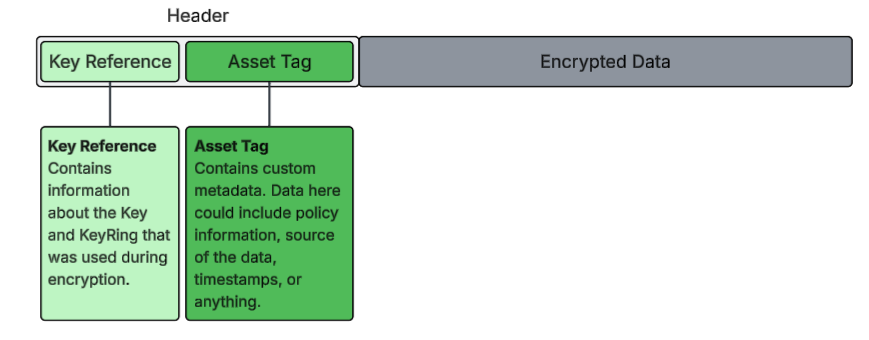
Asset Tagging adds metadata to an encrypted asset that is cryptographically signed. It is stored in the header that is prepended to the encrypted asset. This Tag can be used to manage the asset in any environment, and allow you to track its usage across any systems or workflows.
The metadata is available for viewing on the encrypted Asset. Any changes made to the metadata after it has been signed, will invalidate the Asset, making it impossible to decrypt.
How Does Asset Tagging Work?
Asset Tagging at its core involves storing:
- SHA256 Hash of the metadata
- The IV required to decrypt the asset
Storing these two components guarantees referential integrity. Storing the hash ensures that any changes made to the metadata can be detected, and storing the IV ensures that this information is paired with the correct asset; ie the asset cannot be decrypted without this IV.
An Example
Let's walk through an example of how an Asset Tag is created and signed.
Metadata
{
   "name": "patient-details.docx",
   "policy": {
      "hipaa": true,
      "allowed_purposes": [
         "clinical_trial"
      ]
   }
}
Step 1: Creating an Asset Payload
An Asset Payload is created that contains a SHA256 hash of the json metadata, along with the IV (used in AES-256 GCM encryption) that is required to decrypt the Asset that is being tagged and encrypted.
Asset Payload
{
   "hash": "<sha256 hash of the Payload>",
   "keyData": "<IV>"
}
Step 2: Creating the Signed Asset
Creating the Signed Asset involves using a Signing Key and Signing IV. A unique Signing IV is created that is different from the one that is included in the keyData property of the Asset Payload. It has the following structure:
{
   "asset": "<the original metadata>",
   "sig": "<base64 encoded encrypted Asset Payload>",
   "iv": "<the Signing IV>",
   "ref": "<reference to the Signing Key>"
}
This process allows the metadata to be accessible in its original form, while ensuring the integrity of the original metadata. If the metadata is changed after signing, the hashes will not match, and the Key required to decrypt the asset will not be provided.